
Genlocked Playback & Video Reference Basics
When unfamiliar with the terms "genlock" or "video reference", this article provides clarity on the topic and helps clarify common confusion.
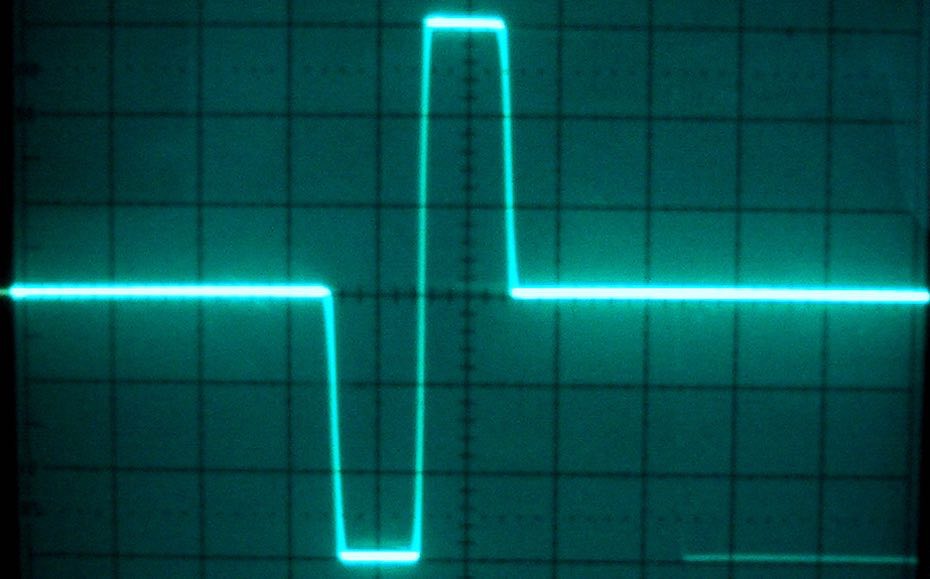 {width=60%}
What is genlock?
When working in a professional post production environment, the terms "video reference" and "genlock" will pop up after some time. But what does genlocking mean and what's a video reference, exactly?
Generator locking or "genlocking" in short is a technique from the video world used to synchronize two or more video signals to coincide with a central timing reference signal - the "video reference". The video reference essentially is a standard video signal which does not contain any picture information but only sync pulses. A sync pulse (shown in the image above) in turn marks the "frame edge" - the point in time where the old video frame ends and the new frame begins. A video reference signal thus only contains frame edge information. The number of sync pulses per second depends on the video reference frame rate - a 25 fps video reference signal will contain 25 sync pulses per second for example.
When a video reference signal is connected to the appropriate reference input of a video card for example, the video card will try to "lock" to that sync pulse so that the card's frame edge coincides with the sync pulse's frame edge. This process is then called "generator locking" as the device locks its own video frame generator to the external reference signal. Once locked, the video card will refresh its output in time with the sync pulses of the reference signal.
In the video world, there's no way around genlocking when two or more video sources are to be mixed together. The frame edges must be aligned to avoid flickering or tearing.
Video reference in an audio post-production environment
This video-related technology is used in the audio postproduction environment. Genlocking is used in both small studios but also in larger facilities. In larger facilities, video reference signals are used as what's called "house sync" or "house reference". As stated above, video reference signals are standard video signals. As such, they can be distributed easily over longer distances throughout a large facility. Aside from the frame edge and thus timing information, video reference signals can also be used as speed reference for other devices. Sync generators like the Rosendahl Nanosyncs HD for example can generate wordclock (the audio counterpart to video reference) in accordance to the video reference input. In general, video reference can be considered a very stable and reliable timing source whereas device internal clocks might drift over time. One device's clock might be slightly faster, the other device's clock slightly slower. Over time, a sync drift may occur. Video reference will prevent that.
Why genlock in Cue Pro?
Genlocking also makes sense in smaller studios and even when using only one computer and Cue Pro. Let's start by explaining what happens when playing back movies in sync with an external video device attached to Cue Pro without genlock.
When starting playback in Cue Pro, it will start the so-called "output loop" of the attached Avid®, Blackmagic or AJA device. From then on, the external video device will pull video frames at a steady rate - the output frame rate, so e.g. 25 fps - from its host application. When play is started in the DAW, Cue Pro will start playback as soon as it receives the first timecode address and send video frames to the external video device for display. However, no mechanism is in place to ensure this happens on the frame edge of the external video device. This results in an offset of up to one frame. The following image illustrates the problem:
 {width=80%}
The top line shows the video frames rendered on the video device, the red lines represent the timecode addresses Cue Pro receives from Pro Tools®. Cue Pro receives the first timecode from Pro Tools® shortly after the frame edge of the external device. It will start playback immediately after the timecode is processed. But although it writes the new video frame to the device immediately, it will not be visible before the next frame edge yielding an offset of up to one video frame.
This doesn't mean that playback will always be off by almost one frame however. The case above shows the worst case scenario. Statistically speaking, the delay will be at around 1/2 movie frame or speaking in milliseconds: around 20 milliseconds (for standard frame rates smaller than 30 fps).
Genlock to the rescue
The only way to get rid of this sync offset is to genlock both Cue Pro and also the DAW. Attaching a video reference to the video player alone doesn't solve the problem as the DAW will still send its timecode at some point in between the frame edges. Only if the DAW is also locked to video reference, it will send its timecode synchronized to the frame edge of the reference signal. To be able to lock Pro Tools® to video reference, an Avid® SYNC I/O or Sync HD™ is required. The SYNC HD user manual states: "When video reference is present, Pro Tools® automatically aligns to frame edge."
This then yields a playback behavior like this:
 {width=80%}